How To Set Up And Warm An Ai Slideshow Account That Actually Gets Sales Earns Commission (2026 Super Affiliates Discussion)
 April 24, 2026
After some feedback on my previous article on how to make millions by posting slideshows on social media >> READ HERE
Let me tell you something that happened to a student of mine.
She created a TikTok account on a Monday.
By Tuesday she had posted seven times.
By Friday, she was frustrated and ready to quit.
Not because her content was bad. It was actually decent. But nobody was seeing it. The views were stuck at 47, 63, 112. The same ten people liking everything.
She thought the algorithm was against her.
It wasn't.
The platform just didn't know who she was yet.
And she never gave it the chance to find out.
So This guide is going to make sure that doesn't happen to you.
Before Anything Else — Decide Who Your Page Is For
This is the decision that determines everything else.
Most people create accounts for everyone. "Digital marketing tips." "Online business." "Make money online." These pages attract attention but convert nobody because they belong to nobody.
You need one specific person.
Not a category. A person.
Here is the example we will use throughout this guide:
Nigerian social media managers who are tired of earning ₦80K–₦150K per month chasing clients and want a system that pays them more for less work.
That is one person. You can picture them. You know their frustration. You know what keeps them up at night.
Every decision you make from here — the page name, the bio, the content, the offer — is made for that one person.
When they land on your page, they should feel something specific: this account was made for me.
That feeling is what makes them follow. Stay. Buy.
Step 1 — Choose Your Page Identity
You have three options and all three work. Pick one and commit.
Option A: Faceless Account
No face. No character. Just content.
Slideshows with clean text, strong hooks, and useful information. The page has a name and a niche but no visible personality behind it.
This is the easiest starting point. Zero pressure. No camera. No appearance anxiety.
It works because the content does all the work.
Option B: AI Influencer Account
You create a character. A fictional Nigerian persona that represents your niche.
This character has a face — generated by AI — and appears consistently across your content. Same person. Same energy. Different posts.
Tools to build your AI character:
Nano Banana on Higgsfield lets you create a consistent AI video character and reuse them across multiple videos. The same face, different scripts. This is what makes the page feel like a real person over time.
The keyword is consistency. Your character should look the same in every post. Same face. Same style. Different content. When someone scrolls your page, it should feel like they're following a real creator.
Option C: Your Own Face, Made Better
You use yourself. But you present the best version.
If you don't have a professional camera or studio, tools like Higgsfield and Nano Banana Pro let you generate clean, professional-looking photos of yourself in different settings and outfits — without actually being there.
Same face. Better lighting. Better background. Better outfit than you own.
This works well for people who want to build long-term personal authority in their niche. Your audience connects with a real person and that trust compounds over time.
There is no wrong choice here. The only wrong choice is switching between them every week. Pick one and stay consistent for at least 30 days.
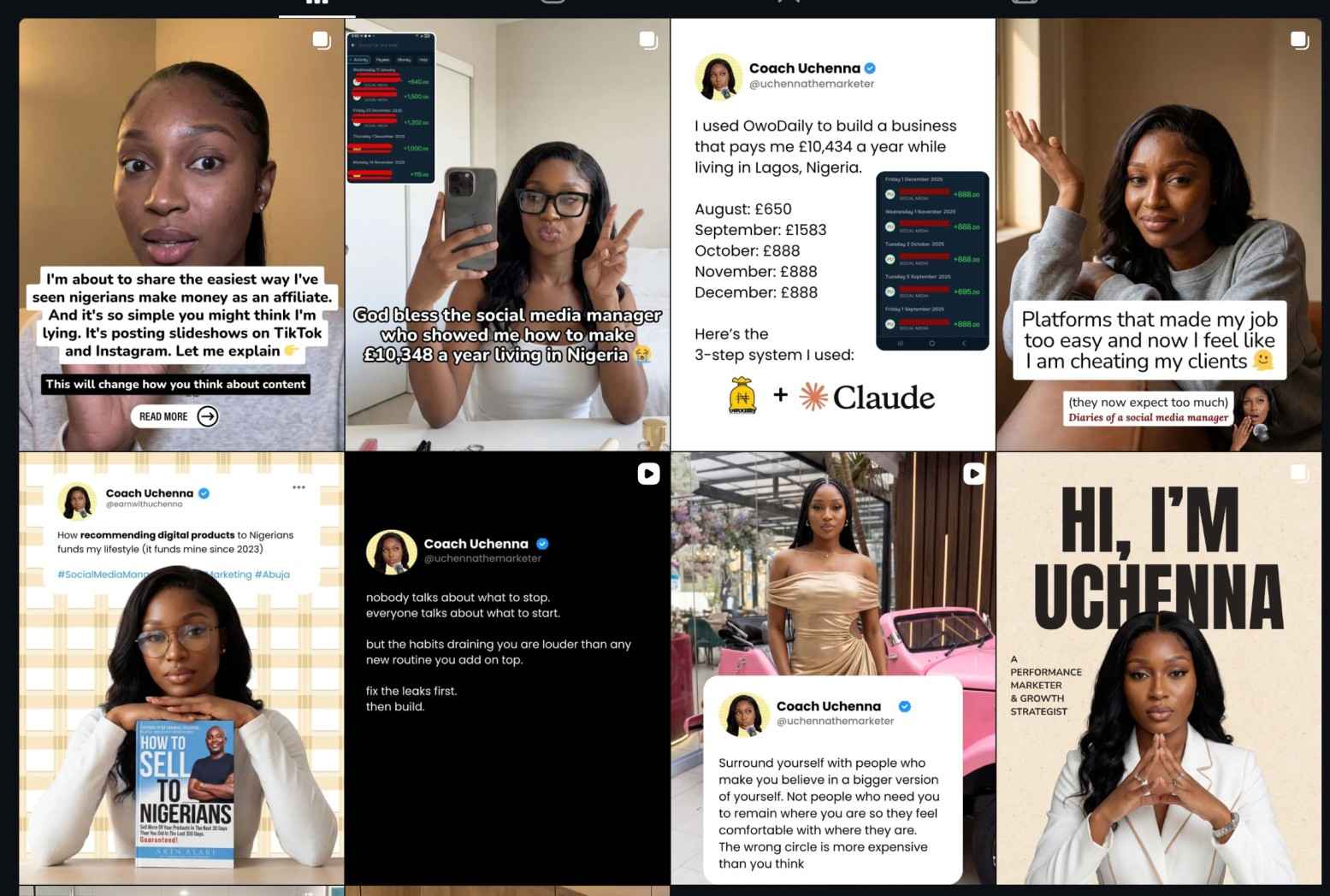
Example Here's my profile
Step 2 — Set Up the Full Profile Before You Post Anything
This is where most people lose before they even start.
They create the account and immediately post. The algorithm sees a brand-new profile with zero history, behaving as if it has 100,000 followers and quietly reduces its reach before anyone even sees it.
Set up everything first. Then warm up. Then post.
Your profile checklist:
Profile picture — if you're faceless, use a clean logo or niche-relevant graphic. If you're using an AI character, use their face. Clear. Not pixelated. Professional enough that someone won't immediately think it's fake.
Username — keep it simple and readable. Something that tells you what the page is about without being complicated. For our example: adaorasmmanagertips or brunoagencyplaybook or nellysocialmediamoney_ng
Bio — this is where you earn the follow before someone even reads your content. Three lines maximum. Line one: who you talk to. Line two: what they get from following you. Line three: your CTA.
Example bio for our social media manager page:
For social media managers ready to stop chasing clients Learn how to charge more and work less ↓ Get the free agency guide
Link in bio — set this up from day one. Even if you're not ready to sell yet, put a placeholder. Linktree works. Later this becomes your ManyChat link or your affiliate offer page.
Story highlight — create at least one before you post. Title it "Start Here" or "About" and add a simple slide explaining what the page is about. This tells the algorithm the account is active and tells visitors they've found the right place.
Step 3 — The Warmup Phase (Do Not Skip This)
The warmup is not optional. It is the foundation on which everything else is built.
Here is exactly what happens when you skip it: your account gets throttled. The algorithm limits how far your content travels. And accounts that get throttled in the first week rarely fully recover their reach ceiling — even months later.
The warmup takes four weeks. Here is the breakdown.
Days 1 to 3 — Zero posts. Only engagement.
Follow 30 to 50 accounts in your niche. These should be accounts your target audience already follows. The big pages in your space. For our example: popular Nigerian digital marketing accounts, social media managers with large followings, and agency owners who post about their work.
Like 15 to 20 posts per day.
Leave 3 to 5 genuine comments daily. Not emoji reactions. Not "great post." Real comments. Something your target audience would actually look at and be like wow, this person understands this business even better. I should probably follow them.
For our example, something like: "This is exactly the conversation I wish someone had with me when I started. Most social media managers don't even realise they're undercharging until it's too late."
That comment tells the algorithm two things. Who you are. And who your audience is.
You are training it without posting a single thing.
Day 4 — Your first post goes up. But not your best one.
Start simple. A basic slideshow. A short tip. Something easy to consume.
Post once every other day this week. Not daily. Not three times a day. Every other day.
From day 4, also start stories. One to two stories per day. Use interactive features — polls, questions, "this or that" options. Something like:
"As a social media manager, what's your biggest problem right now? A: finding clients B: charging what you're worth"
Stories signal to the platform that there is a real, active person behind this account. Feed posts alone don't send that signal strongly enough.
Respond to every comment and every DM you receive this week. Every single one.
Week 2 — One post per day. More engagement.
Increase your daily activity. Like 20 to 30 posts in your niche daily. Leave 5 to 8 comments. Keep responding to everything you receive.
The account is building a behavioral history. A record of consistent human activity. The algorithm is starting to trust it.
Week 3 — Two posts per day. Your real content.
Now you bring out your properly produced slideshows. Your best hooks. Your most targeted content.
Start tracking your non-follower reach. This is the percentage of people seeing your content who don't already follow you. When this number starts climbing, it means the algorithm is beginning to distribute your content to new people. That is the signal you've been waiting for.
Week 4 — Three posts per day. Watch your numbers.
If your reach per post stays stable or grows as you increase volume, the account is ready for full deployment.
If reach per post drops as you increase volume, slow down for one more week. The account needs more time before it can handle that volume.
One important rule: never post at exactly the same time every day with exactly the same format. Platforms look for uniform patterns to identify automated accounts. Vary your posting time by 20 to 40 minutes. Occasionally change your format.
Step 4 — How to Write and Design Slideshows That Stop the Scroll
Your first slide has one job.
Make the exact person you are targeting stop everything they are doing and read the next slide.
That's it. One job.
The hook has to do one of three things:
Name something they're embarrassed about. Say something slightly controversial they've always felt but never heard said out loud. Or show them a result they want so specifically that it feels like you wrote it for them personally.
For our social media manager audience, hooks that work:
"The social media managers earning ₦600K/month are not doing what you think."
"You've been charging ₦80K/month when your colleague figured out a system that pays ₦600K for five hours of work a week."
"Why every social media manager in Nigeria is underpaid — and it has nothing to do with their skills."
See what these do? They speak to one specific person. They name a feeling that person already carries. They create an immediate need to know what comes next.
To write your hooks use Claude.
Open Claude and give it this prompt:
"I am creating TikTok and Instagram slideshows for Nigerian social media managers who feel underpaid and overworked. Write me 15 hook lines for the first slide of a slideshow. The hooks should be slightly controversial, specific to this audience, and make them feel like this content was made for them. Avoid motivational language. Write like a smart Nigerian friend who just discovered something."
Take the best five. Test them.
To design your slideshows, use Canva.
Keep it simple. Dark background with clean white text is the easiest starting point and consistently performs well.
Structure your slideshow like this:
Slide 1 — The hook. One line. Bold text. Nothing else.
Slides 2 to 4 — The story or insight. Name the problem in a way that makes them feel seen. Don't sell anything yet. Just prove you understand their world.
Slides 5 to 7 — The shift. Show them what's possible. The result. The contrast between where they are and where they could be.
Slide 8 to 9 — The solution. Introduce it simply. Don't explain everything.
Last slide — One CTA. One keyword. One action. "Comment AGENCY and I'll send you the breakdown."
Step 5 — Pick Your Affiliate Offer and Set Up ManyChat
Once your page is warming up and getting its first small engagement, set up your conversion system.
Pick your offer.
The offer we are using in this example is an agency course that teaches social media managers how to earn ₦400K to ₦1,000,000 per month by solving a specific problem their high-value clients think of regularly.
Go to the affiliate platform, get your unique link, and set it as your link in bio. You landing page should look something like this
.jpg?table=block&id=310d35e4-41ac-80f7-ae10-d8b978cabc4d&spaceId=926d35e4-41ac-816e-8f96-00039a86e7e1&width=1410&userId=&cache=v2)
Set up ManyChat.
ManyChat connects to your Instagram or TikTok and automatically fires a DM when someone comments a specific keyword.
Your last slide says: "Comment AGENCY and I'll send you the breakdown."
Someone comments AGENCY.
ManyChat sends them a DM instantly. The message is short. Warm. Conversational. It includes your affiliate link.
They arrive pre-sold from the slideshow. They click. They buy. You earn the commission.
You don't need to be online. You don't need to see the comment. The system runs without you.
Step 6 — When to Run Ads
Do not boost anything in the first four weeks.
Wait until a post is naturally getting comments and engagement from strangers. Not from people you engaged with first. From people who found it organically.
When that happens, that post is your signal.
Boost that exact post. Not a new ad. Not a specially designed creative. The post that real people are already responding to.
Because ads don't fix content that isn't working. They amplify content that already is.
When you boost it, target the exact type of person who engaged with it organically. Let the algorithm find more of them.
More reach. More comments. More DMs. More ManyChat automations firing. More commissions.
The Summary of Everything Above
Create the page for one specific person. Set up the full profile before posting anything. Spend three days engaging without posting. Post slowly and simply in week one while adding daily stories. Ramp up gradually across four weeks. Write hooks using Claude. Design slides using Canva. Set up ManyChat from week two onwards. Run ads only on posts already getting organic engagement.
That is the system.
It is not complicated.
It is just specific.
And specificity is exactly what most people skip, which is why most pages never get traction and yours will.
If you want to understand the full business and what is possible when promoting digital products using this strategy, read my first article on mentioned in the beginning of this topic.





 May 09, 2026 at 07:36 PM
 May 25, 2026 at 08:44 PM
- ●Everything You Need To Know About Earning On Owodaily — Micro-jobs, Content Rewards & Bounty Rewards
- ●How I Made ₦18 Million Posting Jobs On Owodaily In 2023
- ●How To Make Affiliate Marketing Easy For Yourself
- ●How To Set Up And Warm An Ai Slideshow Account That Actually Gets Sales Earns Commission (2026 Super Affiliates Discussion)
- ●How To Use Slideshows To Make Up To ₦12,000,000 Promoting Digital Products As A Nigerian Affiliate (2026 Method)
- ●How This Broke Student Built An A.i Start Up That Earns $25 Million Per Year
- ●Cashback, How It Works & How To Make Money (Double Rewards)